Surviving The Pandemic As A Hacker: Peering Behind The Mask

We’re now several months into the global response to the COVID-19 pandemic, with most parts of the world falling somewhere on the lockdown/social distancing/opening up path.

It’s fair to say now that while the medical emergency has not passed, the level of knowledge about it has changed significantly. When communities were fighting to slow the initial spead, the focus was on solving the problem of medical protection gear and other equipment shortages at all costs with some interesting yet possibly hazardous solutions. Now the focus has moved towards protecting the general public when they do need to venture out, and as society learns to get life moving again with safety measures in place.

So, we all need masks of some sort. What type to do you need? Is one type better than another? And how do we all get them when everyone suddenly needs what was once a somewhat niche item?

via Surviving The Pandemic As A Hacker: Peering Behind The Mask — Hackaday

Quote

Why Does Solder Smoke Always Find Your Face?


For some of us the smell of rosin soldering flux vaporizing from the tip of an iron as a project takes shape is as evocative as the scent of a rose on a summer’s day. We’ve certainly breathed enough of it over the years, as it invariably goes from the piece of work directly into the face of the person doing the soldering. This is something that has evidently troubled [AlphaPhoenix], who has gone to extravagant lengths to research the problem using planar laser illumination and a home-made (and possibly hazardous) smoke generator.

He starts with a variety of hypotheses with everything from a human-heat-driven air vortex to the Coandă effect, but draws a blank with each one as he models them using cardboard cut-outs and boxes as well as himself. Finally he has the light bulb moment and discovers that the key to the mystery lies in his arms coming across the bench to hold both iron and solder. They close off an area of lower-pressure dead space which draws the air current containing the smoke towards it, and straight into his face.  It’s something that can be combated with a small fan or perhaps a fume extractor, as despite some video trickery we have yet to master soldering iron telekinesis.

via Why Does Solder Smoke Always Find Your Face? — Hackaday

Quote

Hackaday Prize and Conservation X Labs Issue Design Challenges to Address Extinction Crisis

When most people think of extinct species, they likely imagine prehistoric creatures such as dinosaurs or woolly mammoths. Extinction is something you read about in history books, nature’s way of removing contestants in the great game of life. It’s a product of a cruel and savage world, and outside of a few remaining fringe cases, something that humanity’s advanced technology has put a stop to.

Unfortunately, the truth is far more complicated than that. The planet is currently going through its sixth major extinction event, and this time, it’s our fault. Humanity might not be willfully destroying the natural habitats of the plants, fish, birds, and other lifeforms that have been eradicated, but we’re responsible for it just the same. Humans are an apex predator unlike any the world has ever seen before, and the only force that can stop us is ourselves.

Founded in 2015, Conservation X Labs is devoted to doing everything it can to end this sixth wave of extinction. Unsatisfied with the pace of traditional conservation, they leverage technology and open innovation to develop unique new ways of combating the damage our species has done to life on this planet. After all, it’s the only one we’ve got.

We’ve partnered with this organization to help develop solutions to some of these problems. This includes an open call challenge that anyone can enter, and a Dream Team program that you can get involved with if you act quickly. Let’s take a look at what Conservation X Labs is all about, and what is involved with the challenges at hand.

THE CHALLENGE OF HACKING THE PLANET

With such a worthy goal and their embrace of out-of-the-box thinking, Conservation X Labs was a perfect partner for the 2020 Hackaday Prize. Saving species that have become endangered by human activity requires robust real-world solutions, but if they’re to have any chance at being adopted on a large scale, they need to be deployable at minimal cost and with the least amount of disruption as possible. That can be a difficult balance for large commercial entities to strike, but it’s the sort of thing that the hacking and making community absolutely excels at.

For the 2020 Hackaday Prize, Conservation X Labs has tasked competitors with developing innovative solutions for protecting marine life and combating invasive species. Building hardware that can survive the harsh ocean environment adds an extra dimension of challenge to these entries, and we’re excited to see how the submitted designs take it into account.

According to Sam Kelly, the Conservation Technology Program Manager at Conservation X Labs and mentor for this year’s Hackaday Prize, teams that want to tackle these challenges need to plan ahead if their design is to have any chance of surviving. “Between the salt, weather, pressure, and water, any solution needs to be ready for ingress and corrosion. It is also essential to consider the potential inaccessibility of any deployed device – for both maintenance and communication.”

Teams also have to make special considerations for the end-user. If you’re developing a device that needs to be operated by fishermen on a rocking boat in the middle of the ocean, a tiny touch screen probably isn’t going to work out very well. If it’s too difficult or time consuming to operate, then in all likelihood it just won’t get used.

via Hackaday Prize and Conservation X Labs Issue Design Challenges to Address Extinction Crisis — Hackaday

Quote

Flexible PCB Earrings Put the Art in Art Deco

Exciting flex PCB project from the Hackaday blog:

prototype-macro-e1588531759359

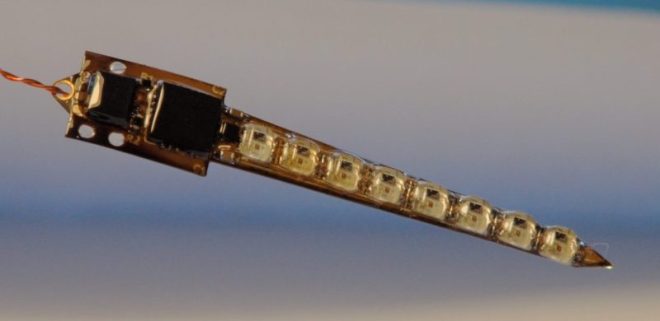
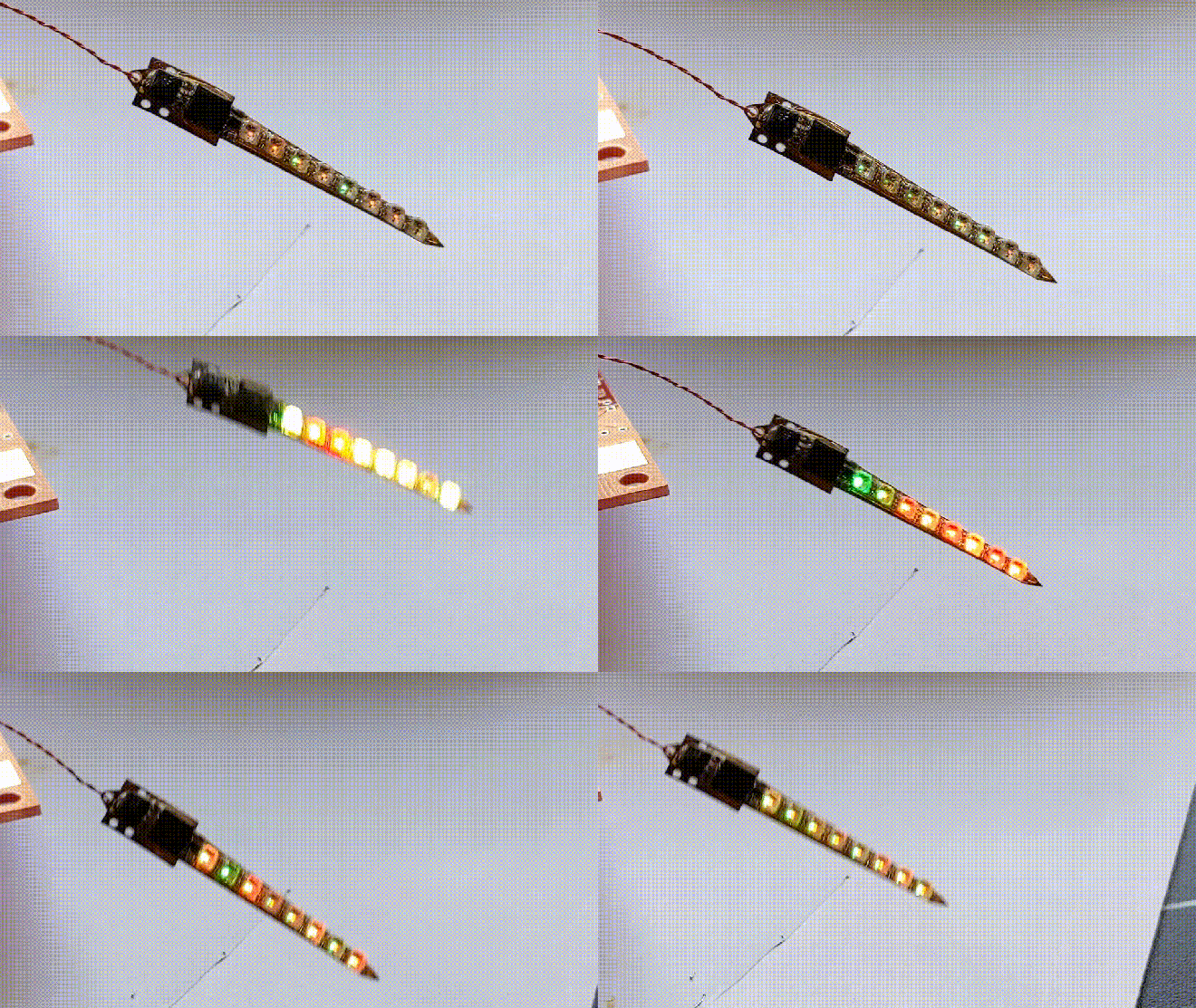
Earrings have been a hackers’ target for electronic attachment for quite a while, but combining the needed components into a package small enough to wear in that finicky location is quite a challenge. If [Sawaiz Syed]’s Art Deco Earrings are anything to go by, ear computers have a bright future ahead of them!

This is a project unusually well described by its name. It is in fact an earring, with art deco styling. But that sells it way too short. This sliver of a flex circuit board is double sided to host an ATtiny, accelerometer, LDO, and eight 2020 formfactor controller-integrated LEDs. Of course it’s motion sensitive, reacting to the wearer’s movement via LED pattern. [Sawaiz] makes reference to wearing it while dancing, and we can’t help but imagine an entire ballroom all aglow with tiny points of LED light.

shimmer

Read more on Hackaday…

Flexible PCB Earrings Put the Art in Art Deco

New Teensy 4.1 Arrives with 100 Mbps Ethernet, High-Speed USB, 8 MB Flash

It was only last August that PJRC released Teensy 4.0. At that time, the 4.0 became the fastest microcontroller development board on the planet, a title it still holds as of this writing — or, well, not exactly. Today the Teensy 4.1 has been released, and using the same 600 MHz ARM Cortex M7 under the hood, is now also the fastest microcontroller board. What the 4.1 brings to the table is more peripherals, memory, and GPIOs. While Teensy 4.0 used the same small form factor as the 3.2, Teensy 4.1 uses the larger board size of the 3.5/3.6 to expose the extra goodies.

The now slightly older Teensy 4.0 — released on August 7th of last year — is priced at $19.95, with the new 4.1 version offered at $26.85. It seems that the 4.1 isn’t intended as a replacement for the 4.0, as they serve different segments of the market. If you’re looking for an ultra-fast affordable microcontroller board that lives up to its Teensy name, the 4.0 fits the bill. On the other hand, if you need the additional peripherals broken out and can afford the space of the larger board, the not-as-teensy-sized 4.1 is for you. How big is it? The sample board I measured was 61 x 18 mm (2.4 x 0. 7″), not counting the small protrusion of the micro-usb jack on one end.

Let’s have a look at all the fun stuff PJRC was able to pack into this space.

100 MBPS ETHERNET

k41_ethernet

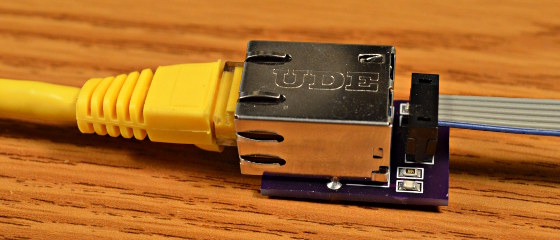
The big news is that Teensy 4.1 comes with 100 Mbps Ethernet support. To use the Ethernet port, you need to supply external magnetics and an RJ-45 jack. These were left off the board for obvious reasons — even using a jack with integrated magnetics (magjack), it wouldn’t fit on the PCB. Instead, a 6-pin header on the board can connect to an external interface. This also helps keep the price low for those who need the other features of the 4.1 without Ethernet connectivity.

PJRC will likely sell a DIY kit of the required parts in the future, but they don’t have a release date or pricing yet. For now, you can easily build your own using this OSH Park shared project. The parts list is in the project’s description, with the key part being the magjack, which will set you back around $2.55 in single quantities. Those building a board should note that this is an early version, and it turns out that only the 0.1 uF capacitor is necessary. Paul Stoffregen of PJRC told me that he just received a simpler PCB for testing, and will publish the design once it’s has been thoroughly verified.

The Ethernet port is capable of full 100 Mbps speed and supports the IEEE 1588 precision time protocol, which allows synchronization of clocks to within 100 ns over wired connections, enabling some very interesting possibilities. But, aside from that, just the inclusion of Ethernet on a microcontroller board is a big deal. Before this, you basically had two choices if you needed this kind of connectivity: use a powerful single-board-computer like a Raspberry Pi with all the latency and headaches the required operating system brings for doing low-level or real-time tasks, or add a slow SPI-interfaced Ethernet board to an existing microcontroller. Instead, you can now use the 600 MHz Cortex-M7 on this new board to run high-bandwidth, low-latency embedded applications without fighting an OS.

via New Teensy 4.1 Arrives with 100 Mbps Ethernet, High-Speed USB, 8 MB Flash — Hackaday

Quote

Open Source Pick and Place Has a $450 BOM Cost

Give your grizzled and cramped hands a break from stuffing boards with surface mount components. This is the job of pick and place machine, and over the years these tools of the trade for Printed Circuit Board Assembly (PCBA) have gotten closer to reality for the home shop; with some models diving below the $10,000 mark. But if you’re not doing it professionally, those are still unobtanium.

The cost of this one, on the other hand, could be explained away as a project in itself. You’re not buying a $450 shop tool, you’re purchasing materials to chase the fever dream of building an open source pick and place machine. There are two major parts here, an X/Y/Z machine tool that can also rotate the vacuum-based parts picker, and the feeders that reel out components to be placed. All of this is working, but there’s still a long road to travel before it becomes a set and forget machine.

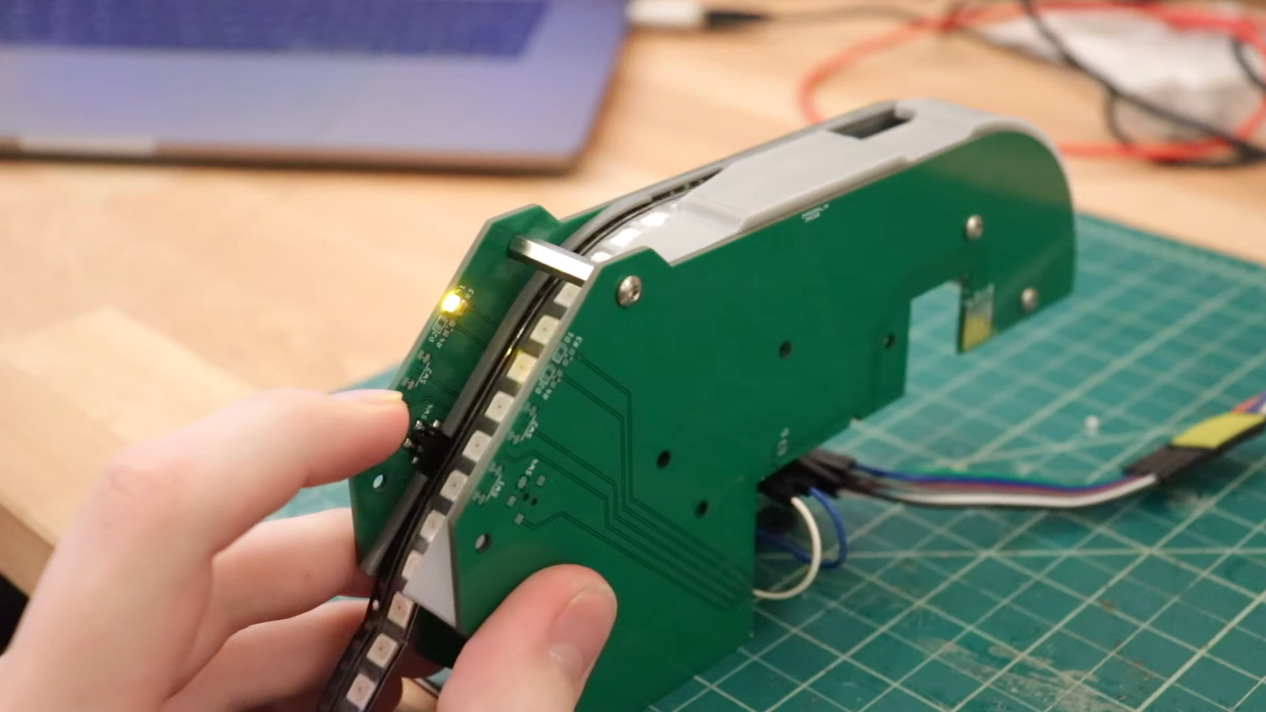
The rubber hits the road in two ways with pick and place machines: the feeders, and the optical placement. The feeders are where [Stephen Hawes] has done a ton of work, all shown in his video series that began back in January. The stackup of PCBs and 3D-prints hangs on the front rail of the gantry assembly, is adjustable for tape widths, and uses an interesting PCB encoder wheel and worm-gear for fine-tuning the feed. [Stephen’s] main controller board, a RAMPS shield for and Arduino Mega that runs a customized version of Marlin, can work with up to 32 of these feeders.

via Open Source Pick and Place Has a $450 BOM Cost — Hackaday

Quote

ESP32-S2 Hack Chat with Adafruit on Hackaday

AdafruitESP32HackChatPosterV1_1-01

Join us on Wednesday, May 6 at noon Pacific for the ESP32-S2 Hack Chat with Limor “Ladyada” Fried and Scott Shawcroft!

When Espressif released the ESP8266 microcontroller back in 2014, nobody could have predicted how successful the chip was to become. While it was aimed squarely at the nascent IoT market and found its way into hundreds of consumer devices like smart light bulbs, hackers latched onto the chip and the development boards it begat with gusto, thanks to its powerful microcontroller, WiFi, and lots of GPIO.

The ESP8266 was not without its problems, though, and security was always one of them. The ESP32, released in 2016, addressed some of these concerns. The new chip added another CPU core, a co-processor, Bluetooth support, more GPIO, Ethernet, CAN, more and better ADCs, a pair of DACs, and a host of other features that made it the darling of the hacker world.

Now, after being announced in September of 2019, the ESP32-S2 is finally making it into hobbyist’s hands. On the face of it, the S2 seems less capable, with a single core and neither Bluetooth nor Ethernet. But with a much faster CPU, scads more GPIO, more ADCs, a RISC-V co-processor, native USB, and the promise of very low current draw, it could be that the ESP32-S2 proves to be even more popular with hobbyists as it becomes established.

To talk us through the new chip’s potential, Limor “Ladyada” Fried and Scott Shawcroft, both of Adafruit Industries, will join us on the Hack Chat. Come along and learn everything you need to know about the ESP32-S2, and how to put it to work for you.

join-hack-chatOur Hack Chats are live community events in the Hackaday.io Hack Chat group messaging. This week we’ll be sitting down on Wednesday, May 6 at 12:00 PM Pacific time. If time zones have got you down, we have a handy time zone converter.

Click that speech bubble to the right, and you’ll be taken directly to the Hack Chat group on Hackaday.io. You don’t have to wait until Wednesday; join whenever you want and you can see what the community is talking about.

via ESP32-S2 Hack Chat with Adafruit — Hackaday

Quote

Debugging Electronics: To Know Why It Didn’t Work, First Find What It Is Actually Doing

Congratulations, you have just finished assembling your electronics project. After checking for obvious problems you apply power and… it didn’t do what you wanted. They almost never work on the first try, and thus we step into the world of electronics debugging with Daniel Samarin as our guide at Hackaday Superconference 2019. The newly published talk video embedded below.

Beginners venturing just beyond blinking LEDs and premade kits would benefit the most from information here, but there are tidbits useful for more experienced veterans as well. The emphasis is on understanding what is actually happening inside the circuit, which explains the title of the talk: Debugging Electronics: You Can’t Handle the Ground Truth! So we can compare observed behavior against designed intent. Without an accurate understanding, any attempted fix is doomed to failure.

To be come really good at this, you need to embrace the tools that are often found on a well stocked electronics bench. Daniel dives into the tricks of the trade that transcend printf and blinking LED to form a plan to approach any debugging task.

via Debugging Electronics: To Know Why It Didn’t Work, First Find What It Is Actually Doing — Hackaday


Quote

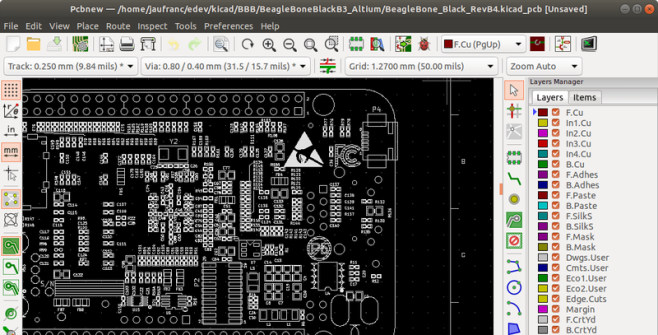
Altium to KiCad converter

BeagleBone-Black-Altium-KiCad-e1586729430477

Around these parts we tend to be exponents of the KiCad lifestyle; what better way to design a PCBA than with free and open source tools that run anywhere? But there are still capabilities in commercial EDA packages that haven’t found their way into KiCad yet, so it may not always be the best tool for the job. Altium Designer is a popular non-libre option, but at up to tens of thousands of USD per seat it’s not always a good fit for users and businesses without a serious need.

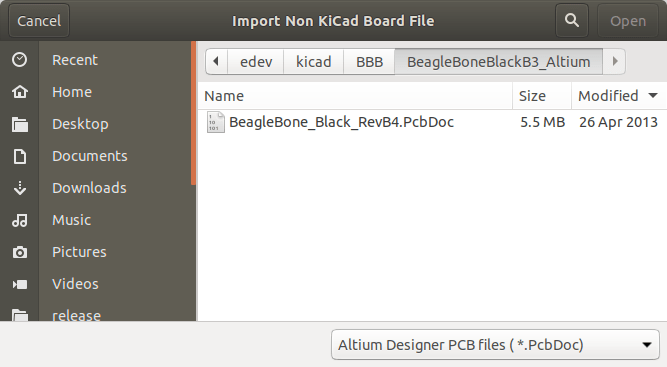
It’s hard to find an exciting photo of a dialog box

What do you do as a KiCad user who encounters a design in Altium you’d like to work with? Well as of April 3rd 2020, [Thomas Pointhuber] has merged the beginnings of a native Altium importer into KiCad which looks to be slated for the 6.0 release. As [Thomas] himself points out in the patch submission, this is hardly the first time a 3rd party Altium importer has been published. His new work is a translation of the Perl plugin altium2kicad by [thesourcerer8]. And back in January another user left a comment with links to four other (non-KiCad) tools to handle Altium files.

If you’d like to try out this nifty new feature for yourself, CNX has a great walkthrough starting at building KiCad from source. As for documents to test against the classic BeagleBone Black sources seen above can be found at on GitHub. Head past the break to check out the very boring, but very exciting video of the importer at work, courtesy of [Thomas] himself. We can’t wait to give this a shot!

via Altium has its 2kicad Moment — Hackaday

Quote

Hackaday: PCB Bring-Up Hack Chat

Join us on Wednesday, April 15 at noon Pacific for the PCB Bring-Up Hack Chat with Mihir Shah and Liam Cadigan!

The printed circuit design process is pretty unique among manufacturing processes. Chances are pretty good that except for possibly a breadboard prototype, the circuit that sits before you after coming back from assembly has only ever existed in EDA software or perhaps a circuit simulator. Sure, it’s supposed to work, but will it?

You can — and should — do some power-off testing of new boards, but at some point you’re going to have to flip the switch and see what happens. The PCB bring-up process needs to be approached carefully, lest debugging any problems that crop up become more difficult than need be. Mihir and Liam from inspectAR will discuss the bring-up process in depth, offering tips and tricks to make things go as smoothly as possible, as well as demonstrating how the inspectAR platform can fit into that process, especially with teams that are distributed across remote sites. If your board releases the Magic Smoke, you’ll want to know if it’s your design or an assembly issue, and an organized bring-up plan can be a big help.

Note: Liam will be doing a simulcast web demo of inspectAR via Zoom. ​

via PCB Bring-Up Hack Chat — Hackaday

Quote