Jared Wolff talks Cellular IoT

The Amp Hour #509: Cellular IoT with Jared Wolff

Welcome Jared Wolff of Circuit Dojo!

Jared is a graduate of the Rochester Institute of Technology (which Chris also considered attending). He did co-ops while there, like we talked about on last week’s episode.

While on co-op at Cisco, he was in the cable group and marveled at the techs doing repairs with magnet wire.

He is an east coast guy at heart, so he moved back to Connecticut eventually

Jared worked at Apple for a while, but the lifestyle is difficult because of time requirements and stressful travel. He was also there when Steve Jobs was still around and there was a bit of over the top hero worship.

Nordic’s early bluetooth chipset was the nRF8001, which was a transceiver over SPI (no micro)

Working for startups was interesting if you thrive on doing a lot of different things

Jared Wolff talks Cellular IoT

Hackaday is hiring writers

You wake up in the morning, and check Hackaday over breakfast. Then it’s off to work or school, where you’ve already had to explain the Jolly Wrencher to your shoulder-surfing colleagues. And then to a hackspace or back to your home lab, stopping by the skull-and-cross-wrenches while commuting, naturally. You don’t bleed red, but rather #F3BF10. It’s time we talked.

The Hackaday writing crew goes to great lengths to cover all that is interesting to engineers and enthusiasts. We find ourselves stretched a bit thin and it’s time to ask for help. Want to lend a hand while making some extra dough to plow back into your projects? We’re looking for contributors to write a few articles per week and keep the Hackaday flame burning.

Contributors are hired as private contractors and paid for each article. You should have the technical expertise to understand the projects you write about, and a passion for the wide range of topics we feature. You’ll have access to the Hackaday Tips Line, and we count on your judgement to help us find the juicy nuggets that you’d want to share with your hacker friends.

If you’re interested, please email our jobs line (jobs at hackaday dot com) and include:

  • One example article written in the voice of Hackaday. Include a banner image, at least 150 words, the link to the project, and any in-links to related and relevant Hackaday features. We need to know that you can write.
  • Details about your background (education, employment, interests) that make you a valuable addition to the team. What do you like, and what do you do?
  • Links to your blog/project posts/etc. that have been published on the Internet, if any.

Read more….

Hackaday is hiring writers

Send Hackday a short video of yourself for Remoticon

From today’s Hackaday newsletter:

Remoticon is Hackaday’s November con (Nov 6 – 8), and it’s all about hardware, workshops, Hackaday Prize, and a difficult soldering challenge. We’re putting together a Hackaday Community video for the Remoticon opener and you should definitely be in it.

Turn your phone to landscape view, go to a quiet place that’s outside, and tell us your name, where you are in the world, and what you’re working or procrastinating on. Your video should be 30 seconds or less. Then send your video to [email protected].

We can’t wait to see you on the small screen –  we miss all of your faces.

Send Hackday a short video of yourself for Remoticon

October is Open Hardware Month

October is right around the corner, which means it’s time to get ready for Open Hardware Month! This year with the theme is Label and Certify to the spotlight on two ways to help the world know your hardware is Open Source:

Label and Certify This Open Hardware Month

Open Hardware Facts

Inspired by our Executive Director Alicia Gibb, and created by board member Jeffrey Yoo Warren, the Open Hardware Facts Generator helps you declare the licenses used in your project using a format similar to the US Nutrition Facts Label. Listing your licenses in one prominent place (such as the README of your repository) helps users immediately know what they can and can’t do with your source, rather than having to browse through individual files.

OSHWA Certification

The OSHWA Certification continues to grow, with almost 1,000 projects from over 40 countries! If you’re not yet familiar, the certification program provides a way for consumers to immediately recognize hardware whose meaning of “Open” conforms to the OSHW Definition. It also provides a directory for OSHW creators, which stands as evidence that your product is in compliance with the OSHW Definition.

Hosting and Joining OHM Events

We invite individuals and companies alike to host events relating to the theme, or supporting Open Hardware more generally. Unlike previous years, we expect most events to be virtual due to COVID-19. Thankfully, both labeling and certifying can be done from home! If you choose to host an in-person event, we expect you to follow all local health guidelines to help keep our community safe. Find what you need to plan an OHM event at the OHM website.

Looking for an OHM event to join? As events are submitted and approved, they’ll be listed on the OHM website as well. For virtual events, we’ll also list the online platform being used and the event’s time zone.

October is Open Hardware Month

DipDuino: an Arduino clone made for breadboarding

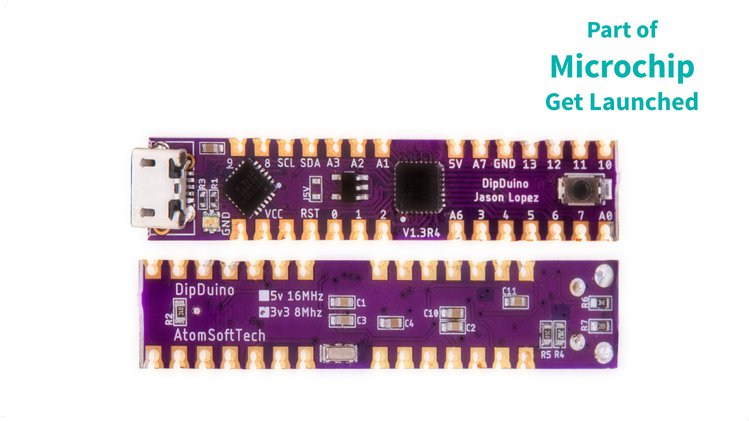
Jason Lopez of AtomSoft has designed an Arduino clone made for breadboarding and it is coming soon to Crowd Supply:

DipDuino An Arduino clone made for breadboarding

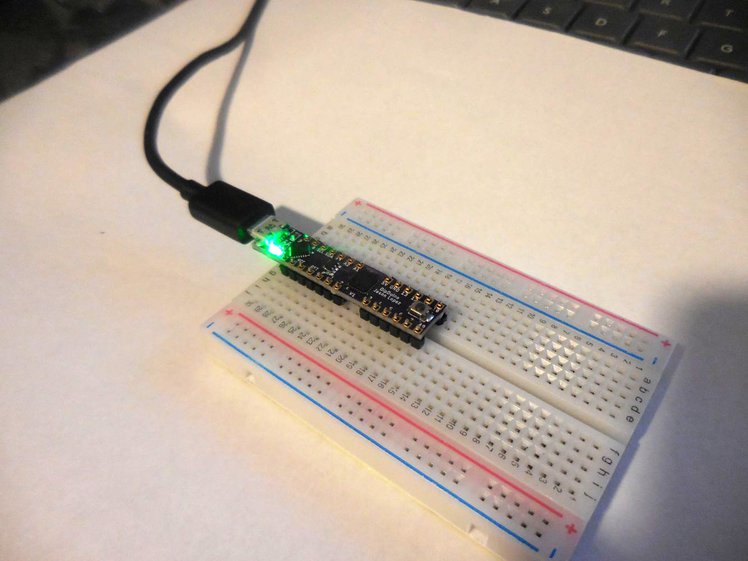
DipDuino is an Arduino clone that’s really small, even simpler to use, and designed for clean use with breadboards. It solves the problem of needing to jump wires from an external board to a breadboard, as well as the need to fit a PCB in a tight spot. Having the entire Arduino on a breadboard (including programmer) allows for easier transport and less chance of something being pulled off. Being so small allows it to fit inside a range of enclosures and odd places.

Just like the Arduino Pro Mini, you get access to all the pins possible; but DipDuino is presented in an easier-to-use package and with a built-in programmer. Not only is the package smaller, but the castellated holes allow you to use it a surface mount type of PCB as well.

  • Processing:
    • Microchip ATmega328P
    • 8-bit AVR processor operating at 8 MHz (3.3 V) or 16 MHz (5 V)
    • 32 KB flash, of which 2 KB is used by bootloader
    • 2 KB SRAM
    • 1 KB EEPROM
  • Power:
    • Available in 5 V or 3.3 V versions
    • 5 V provided by USB
    • 600 mA 3.3 V LDO regulator on 3.3 V version
    • RGB LED – power is GREEN
  • USB:
    • USB Micro Type-B connector
    • CP2102N for USB-to-UART bridge
    • RGB LED – Tx (BLUE) & Rx (RED)
  • Form-factor:
    • Breadboard-friendly
    • Small size: 9.7 x 48.8 mm (0.38 x 1.92 in)
  • Connectivity:
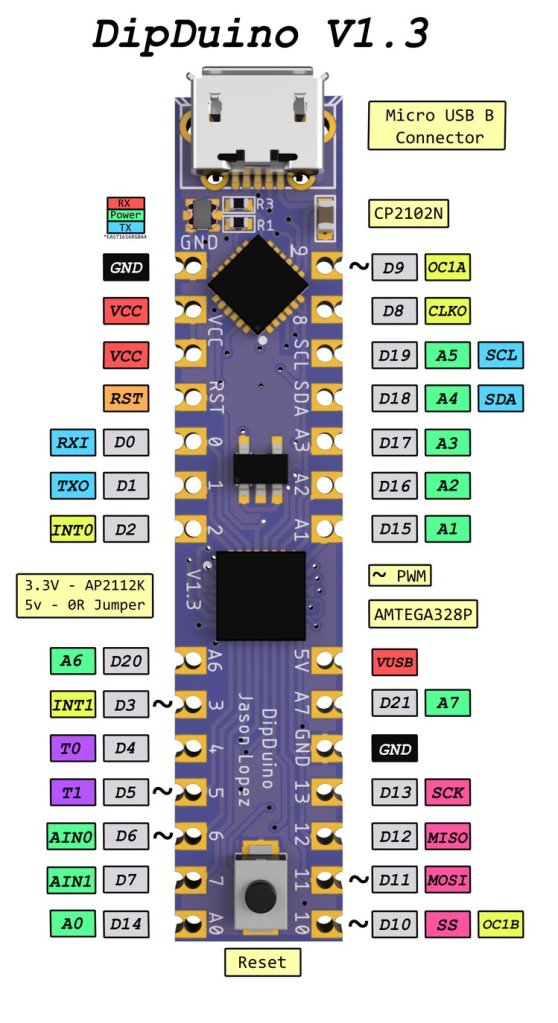
    • 1x SPI, 1x I²C, 1x UART, 6x PWM, 8x ANALOG, 2x EINT
    • 21 GPIO broken out to standard breadboard-pitch holes as well as castellated holes for surface-mounting
    • USB for programming and USB-to-UART applications
    • EAST1616RGBA4 RGB LED for power/UART
  • Supports Arduino IDE:
    • Board set as Arduino Pro or Pro Mini

Free Up More Space on Your Breadboard

It’s annoying to always have jump wires from an Arduino to a breadboard for testing. Existing alternatives, like the Arduino Mini and Pro do not have built-in programmers and they do not fit nicely on a breadboard. Just about all Arduino clones that were breadboard-able are huge and take up way too many rows of the breadboard itself.

DipDuino: an Arduino clone made for breadboarding

First certified open source hardware from El Salvador

OSHWA has announced the first certified open source hardware from El Salvador:

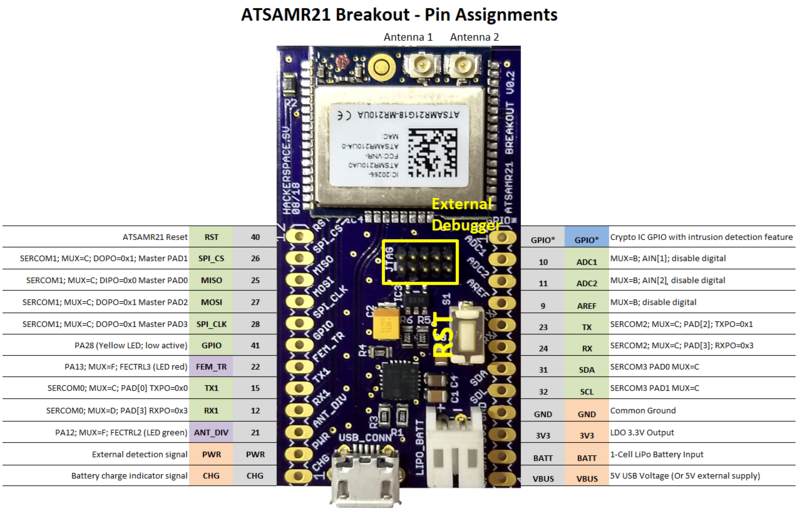
Hackerspace San Salvador ATSAMR21 Breakout

The breakout board uses the module ATSAMR21G18A-MR210UA. This module combines the ATSAMR21G18, a 4Mb Flash memory AT45DB041E and a crypto-authentication chip ATECC508A.

This breakout board also includes a power-path/LiPo charge management unit MCP73871 and a very low dropout 3.3V regulator LD3985M33R.

  • 32 bits ARM Cortex M0+ microcontroller
  • 2.4GHz low-power transceiver for IEEE 802.15.4 + ZigBee
  • 256KB Flash
  • Maximum operating frecuency of 48MHz
  • Integrated temperature sensor
  • 4Mb external Flash memory
  • Cryto chip with: Secure key storage, high-speed public-key algorithms, elliptic curves support (NIST P256), SHA-256, unique serial number, high-quality RNG.
  • Pre-set MAC address

Design files for this board are available on GitHub.

First certified open source hardware from El Salvador

RISC-V Global Forum on Thursday, Sept. 3rd

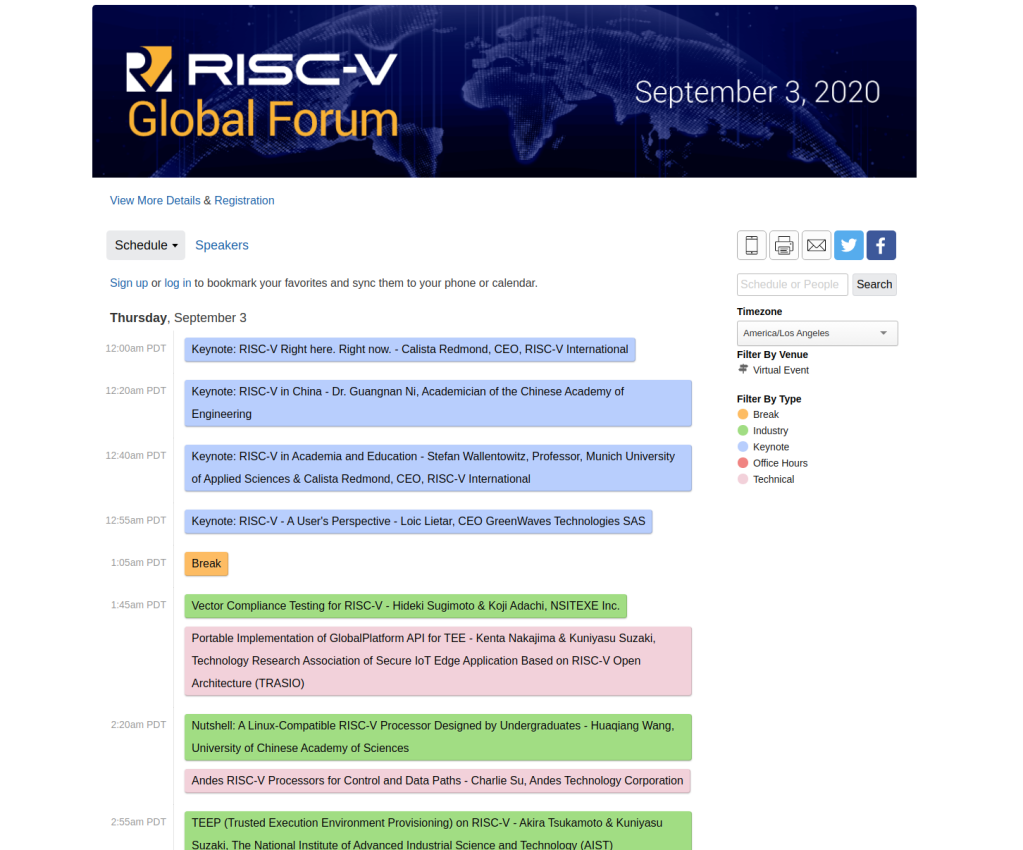
RISC-V International and the Linux Foundation are running an 18-hour global forum this Thursday, September 3rd, spanning all time zones:

RISC-V is breaking down technical barriers and disrupting traditional microprocessor business models through global collaboration. The RISC-V Global Forum is our opportunity to engage across the community, from start-ups to multi-nationals, from students to luminaries, from deep technical talks to understanding industry momentum. Join us as a sponsor to showcase success and opportunity, as a speaker to share progress and perspective, and as an attendee to hear from industry thought leaders, engage with your peers, and join the community.

  • San Francisco 12:00 AM – 6:00 PM
  • Barcelona 9:00 AM – 3:00 AM
  • Shanghai 3:00 PM – 9:00 AM

The full schedule is available:

RISC-V Global Forum on Thursday, Sept. 3rd

Label and Certify This Open Hardware Month

An update from the Open Source Hardware Association (OSHWA):

Label and Certify This Open Hardware Month

October is right around the corner, which means it’s time to get ready for Open Hardware Month! This year with our theme of Label and Certify we’re putting the spotlight on two ways to help the world know your hardware is Open Source: Open Hardware Facts and the OSHWA Certification.

Open Hardware Facts

Inspired by our Executive Director Alicia Gibb, and created by board member Jeffrey Yoo Warren, the Open Hardware Facts Generator helps you declare the licenses used in your project using a format similar to the US Nutrition Facts Label. Listing your licenses in one prominent place (such as the README of your repository) helps users immediately know what they can and can’t do with your source, rather than having to browse through individual files.

OSHWA Certification

The OSHWA Certification continues to grow, with almost 1,000 projects from over 40 countries! If you’re not yet familiar, the certification program provides a way for consumers to immediately recognize hardware whose meaning of “Open” conforms to the OSHW Definition. It also provides a directory for OSHW creators, which stands as evidence that your product is in compliance with the OSHW Definition.

Hosting and Joining OHM Events

We invite individuals and companies alike to host events relating to the theme, or supporting Open Hardware more generally. Unlike previous years, we expect most events to be virtual due to COVID-19. Thankfully, both labeling and certifying can be done from home! If you choose to host an in-person event, we expect you to follow all local health guidelines to help keep our community safe. Find what you need to plan an OHM event at the OHM website.

Looking for an OHM event to join? As events are submitted and approved, they’ll be listed on the OHM website as well. For virtual events, we’ll also list the online platform being used and the event’s time zone.

Label and Certify This Open Hardware Month

Hackaday: Tech At Home Winners Who Made the Best of their Quarantine

Back in April we challenged hackers to make the best of a tough situation by spending their time in isolation building with what they had laying around the shop. The pandemic might have forced us to stay in our homes and brought global shipping to a near standstill, but judging by the nearly 300 projects that were ultimately entered into the Making Tech At Home Contest, it certainly didn’t stifle the creativity of the incredible Hackaday community.

While it’s never easy selecting the winners, we think you’ll agree that the Inverse Thermal Camera is really something special. Combining a surplus thermal printer, STM32F103 Blue Pill, and OV7670 camera module inside an enclosure made from scraps of copper clad PCB, the gadget prints out the captured images on a roll of receipt paper like some kind of post-apocalyptic lo-fi Polaroid.

Tech At Home Winners Who Made the Best of their Quarantine — Hackaday
Hackaday: Tech At Home Winners Who Made the Best of their Quarantine

Hackspace Mag: PCB design – the open way!

My column from the latest issue of Hackspace Magazine:

PCB design – the open way!

You’ve had an awesome idea for a new project, you’ve managed to get your breadboard prototype working and you’re ready to commit to making your design into a shiny new Printed Circuit Board (PCB). To do that, you’ll need to create a schematic and PCB layout using some kind of Electronic Design Automation (EDA) software. Let’s take a look at some of the options.

Altium is Windows-only proprietary software common in professional settings where the company can afford hefty licencing fees. Autodesk Eagle is also proprietary but runs on Mac, Linux and Windows. Eagle has a restricted free version that is popular with students and hobbyists. The commercial licensing is way less expensive than Altium, making Eagle popular with smaller businesses, including many famous Open Source Hardware (OSHW) organizations like Adafruit, Arduino and Sparkfun.

In recent times a free and Open Source software suite called KiCad has been making waves in the PCB design world. KiCad has been around since 1992, when it was created by Jean-Pierre Charras. Until relatively recently KiCad was a small fish in the EDA software pond, but in 2013 the iconic research organisation CERN started to invest in KiCad as part of their Open Hardware initiative

This commitment from CERN improved KiCad dramatically, in terms of stability, functionality and popularity. They worked on crucial features including a push and shove router which is capable of routing differential pairs and interactively tuning trace lengths. These higher end features allowed KiCad to handle more complex designs, including critical hardware controlling experiments at CERN, a complex 64 bit ARM single board computer by Olimex and the MNT Reform, a fully Open Source laptop by Lukas Hartmann. DigiKey is also investing heavily into KiCad, including developing a parts library and releasing a ten part KiCad video series on YouTube with Shawn Hymel.

A great way to get started with KiCad is “Getting to Blinky”, a video tutorial by Chris Gammell.  There’s also KiCon, a conference dedicated to KiCad where you can learn from other designers. The next KiCon will be held online in September 2020.

Like many Open Source software projects, KiCad gets funding for developer time through donations. Hopefully these donations will allow project leader Wayne Stambaugh and other core developers to dedicate more time to KiCad development. If you want to support of professional-quality PCB design tools without cost, functionality or intellectual property restrictions, you can donate to KiCad through the Linux Foundation.

The PDF is available to download from Hackspace.

Hackspace Mag: PCB design – the open way!