QRP-Labs filter adapter for NanoVNA

nanovna_qrplabs_06

QRP-Labs filter adapter for NanoVNA

I had a few QRP-labs lowpass filters and bandpass filters kits laying around and because I had nothing better to do this afternoon, I fired up the soldering station and assembled them. After that they need to be tested and tuned.

Owning a NanoVNA for a few months now (and hardly use it because for antenna stuff i use my RigExpert AA-600), I decided to use the NanoVNA for tuning the filters. So from some pieces out of my junkbox (a piece of double sided pcb, 2 sma chassis and a header cut in 2) I build this simple filter holder allowing me to test and tune the filters to my requirements.

Adding the 3D printed base plate, hooking it with my NanoVNA.

nanovna_qrplabs_06

Doing the calibration routine.

nanovna_qrplabs_06

And ready for testing.

nanovna_qrplabs_06

As expected like the previous design. But now no aditional PCB for calibration.

nanovna_qrplabs_06

Can only say that the purple on yellow looks cool 🙂

For those who want a adapter, checkout my ForSale page.

QRP-Labs filter adapter for NanoVNA

Musique Concrète Clock

We are excited to see this awesome project from Cedar Grove:

https://www.youtube.com/watch?v=t7I-2vPSn_E&feature=youtu.be

Installation of the Musique Concrète Clock. A hybrid repair of a damaged heirloom clock using the original acoustic whistles and chime wire. The sound components are activated by servo motors and a solenoid driven by an Adafruit Cricket, custom I2C host interface module, and PyBadge with a real-time clock FeatherWing. Control software is implemented with CircuitPython.

https://twitter.com/CedarGroveMakr/status/1271209134713528326

Musique Concrète Clock

Dexter the Companion Bot Wants To Give You Five

From Roger Cheng on Hackaday:

The main character of Dexter’s Laboratory is a genius child inventor who inspired a lot of fans to become makers and inventors in their own right. [Jorvon Moss] a.k.a. [Odd_Jayy] counts himself as one of them. A serial companion bot builder, his projects are constantly evolving. But every once in a while he pauses long enough to share construction details. Like how we can build our own monkey companion bot Dexter named after the cartoon.

A slightly earlier iteration of Dexter attended Hackaday Superconference 2019. Perched on [Odd_Jayy]’s back, Dexter joined in a presentation on companion bots. We’ve been a fan of his work since Asi the robot spider and several more robots have been posted online since. Recently at Virtually Maker Faire 2020, he joined [Alex Glow] and [Angela Sheehan] to talk about their respective experiences Making Companion Bots.

[Odd_Jayy] starts with sketches to explore how a project will look and act, striving to do something new and interesting every time. One of Dexter’s novelties is adding interactivity to companion bots. Historically people couldn’t do much more than just look at a companion bot, but Dexter can high five their fans! Sometimes the excited robot monkey ends up slapping [Odd_Jayy] instead, but they’re working through issues in their relationship. Everyone is invited to see rapid cycles of iterative improvements on Twitter and Instagram. As of this writing, a mini Dexter is underway with design elements similar to the “Doc Eyes” goggle project running in parallel. It’s always fun to watch these creations evolve. And by openly sharing his projects both online and off, [Odd_Jayy] is certainly doing his part to inspire the next wave of makers and inventors.

via Dexter the Companion Bot Wants To Give You Five — Hackaday

Quote

Tindie: breadboard-friendly button from AtomSoft

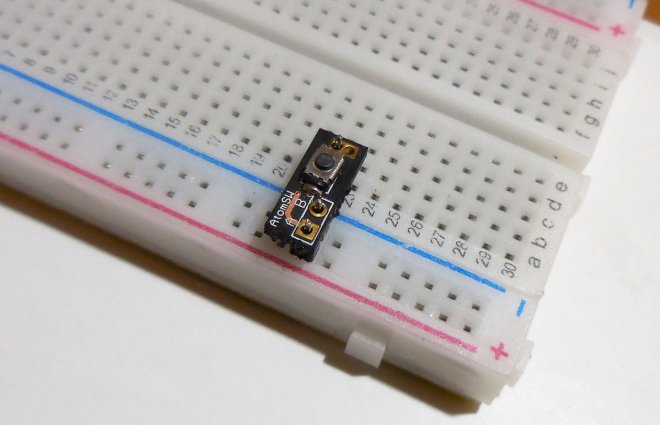
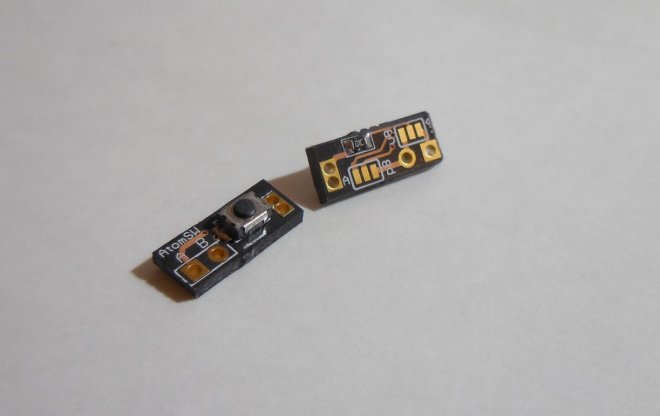
AtomSoftTech has a convenient little board to make it easy to connect a tact switch to a breadboard:

2020-06-08T22_59_20.243Z-atomSW_md

AtomSW on Tindie

What is it?

A button you can be glad to have.

Why did you make it?

There isnt a small breadboard-able button out there with the features on this one.

What makes it special?

You have a selectable Pull-Up or Pull-Down and selectable High Output or Low Output. Using simple solder jumpers you can select between Pull up or Pull Down and what is the output of the button. All in a TINY PCB takinng almost no space on your PCB. No need to wire anything its breadboard friendly. Connects to the power rails and data side as well

2020-06-09T00_53_24.853Z-AtomSW_BF

Tindie: breadboard-friendly button from AtomSoft

N64 Portable, Zelda Style!

From the Downing’s Basement blog:

Project 15: My Latest N64 Portable, Zelda Style!

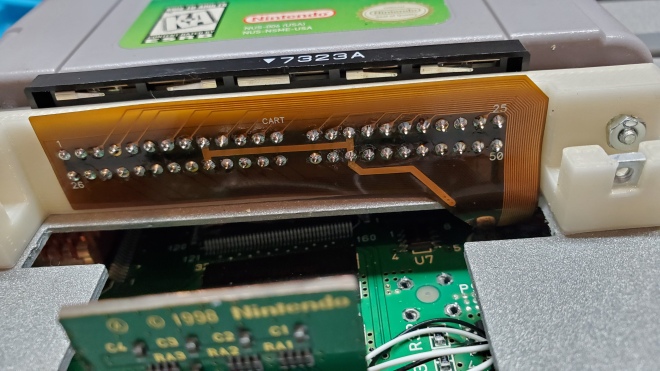
I wish I could say that it hasn’t been two years since this project was commissioned…I also wish I could say this wasn’t the second time the job was completed…but if I didn’t have too, this beauty would have never existed. Kinda funny how that works.

But that said, after two years since the original agreement and a total remake of the original failure, Project 15 has come to light in the most beautiful portable console I’ve ever made. But not only has this been a technical achievement for me in many respects, but I’m very proud of the video I’ve made to accompany it.

You don’t have to scroll down very far in past posts to see what prompted this rebuild but at this point I can honestly say I’m glad it happened!

20200428_181806

And on the subject of reliability, low volume FFC PCB’s have become available through services like OSH Park which have allowed some very time and space saving options that do wonders for the assembly.

Read more…

Quote

Test fixture for the OrangeCrab

We are excited about the OrangeCrab FPGA dev board by Greg Davill as it packs the power of an ECP5 FPGA, which has an open source design flow, and 128MB DDR3 RAM into the Adafruit Feather form-factor:

Screenshot from 2020-06-08 15-38-18

We were happy to fabricate the boards for test fixture and it is great to see Greg showing it is action:

Along with the process he went through assembling it:

Test fixture for the OrangeCrab

Adjustable Jig Eases PCB Stencil Alignment Process

PCB stencils make application of solder paste a snap, but there’s a long, fussy way to go before the paste goes on. You’ve got to come up with some way to accurately align the stencil over the board, which more often than not involves a jury-rigged setup using tape and old PCBs, along with a fair amount of finesse and a dollop of luck.

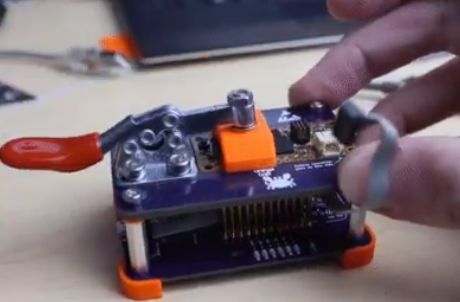
Luckily, [Valera Perinski] has come up with a better way to deal with stencils. The Stencil Printer is a flexible, adjustable alignment jig that reduces the amount of tedious adjustment needed to get things just so. The jig is built mostly from aluminum extrusions and 3D-printed parts, along with a bunch of off-the-shelf hardware. The mechanism has a hinged frame that holds the stencil in a fixed position above a platen, upon which rests the target PCB. The board is held in place by clamps that ride on threaded rods; with the stencil flipped down over the board, the user can finely adjust the relative positions of the board and the stencil, resulting in perfect alignment. The video below is mainly a construction montage, but if you skip to about the 29:00 mark, you’ll see the jig put through its paces.

Granted, such a tool is a lot more work than tape and spare PCBs, but if you do a lot of SMD work, it may be worth the effort. It’s certainly less effort than a solder-paste dispensing robot.

via Adjustable Jig Eases PCB Stencil Alignment Process — Hackaday

Quote

Surviving The Pandemic As A Hacker: Peering Behind The Mask

We’re now several months into the global response to the COVID-19 pandemic, with most parts of the world falling somewhere on the lockdown/social distancing/opening up path.

It’s fair to say now that while the medical emergency has not passed, the level of knowledge about it has changed significantly. When communities were fighting to slow the initial spead, the focus was on solving the problem of medical protection gear and other equipment shortages at all costs with some interesting yet possibly hazardous solutions. Now the focus has moved towards protecting the general public when they do need to venture out, and as society learns to get life moving again with safety measures in place.

So, we all need masks of some sort. What type to do you need? Is one type better than another? And how do we all get them when everyone suddenly needs what was once a somewhat niche item?

via Surviving The Pandemic As A Hacker: Peering Behind The Mask — Hackaday

Quote

Autodesk’s Fusion 360 Merges ECAD, MCAD

From Andy Shaughnessy of Design007 Magazine:

Screenshot from 2020-06-05 23-08-12

Autodesk’s Fusion 360 Merges ECAD, MCAD

I spoke with Autodesk’s Matt Berggren about the company’s Fusion 360 EDA tool and the new capabilities added to the software. Matt explains how Fusion 360 blends ECAD and MCAD functionality in one environment and at an affordable price, and why he believes it will help round out Autodesk’s electronic portfolio with end-to-end capabilities.

Andy Shaughnessy: Matt, you’re the director of the Fusion 360 platform, as well as EAGLE and Tinkercad with Autodesk. Give us some background on yourself and the company.

Matt Berggren: I joined Autodesk about four years ago. I came into the company to build out an electronic design portfolio and a collection of tools that we would ultimately integrate into the design and manufacturing tool suite for the company. If you look at electronics design and manufacturing, it’s the next most obvious adjacency for a company that owns the CNC machining market and3D printing market. We have some experience with geometry, going all the way back to the days of AutoCAD.

The obvious evolution for mechanical design in manufacturing is to start looking more holistically at the product. What’s the physical product that somebody is trying to build? That’s what we would consider being surface modeling, creating shapes and things that entice people but are also ergonomic and make things easy to use and carry. The other side of that, which I think we had to recognize as a company, is that it’s about electronics and electrical intelligence that go into those things. I’d spent a better part of 13 years at Altium. I was at Accel EDA before that with the P-CAD team, so this is not my first rodeo building electronics design software, to say the least.

Autodesk’s Fusion 360 Merges ECAD, MCAD