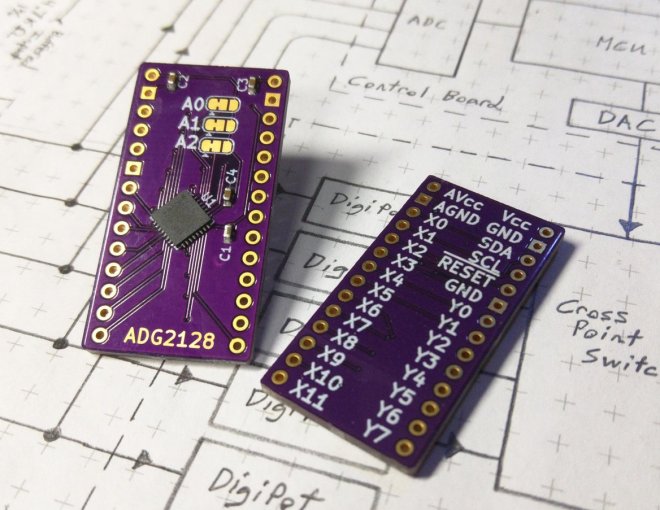
The ADG2128 is an incredibly flexible cross-point switch. It supports 5/-5v, 3.4MHz i2c, and is unrestricted as to its connectivity options between its rows and columns.
This is a high-dollar part, and I’ve been designing with it for more than 5 years. So I polished my breakout board to reuse them during a project’s prototyping phase.
This board has decoupling capacitors adequate to handle the whole analog voltage range, i2c address selection jumpers, and differentiated ground layers for noise isolation or differential operation below 0v, according to the project’s demands.
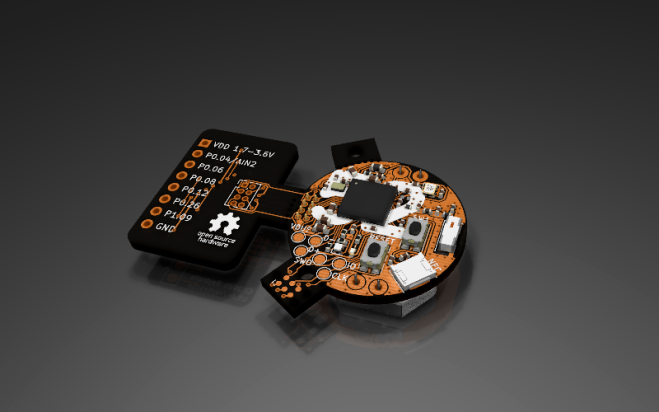
The Raybeacon is full-featured nRF52 based wearable, ultra-low power, multiprotocol development board designed for variety of embedded applications. Due to modular design, the device can be used to build your own production-ready appliance with minimal hardware modifications.
Key features include:
Coin sized – the board is only 25 mm in diameter
Works from a single CR2032 / CR2025 3V button cell
Nordic nRF52 high-end multiprotocol SoC supporting Bluetooth 5.x, Bluetooth mesh, Thread and Zigbee; of your choice:
nRF52833: Cortex-M4F 64MHz, 512KB flash, 128KB RAM, Bluetooth® 5.1 Direction Finding, 105°C temperature qualification
nRF52840: Cortex-M4F 64MHz, 1MB flash, 256KB RAM, Bluetooth® 5.0, ARM TrustZone® CryptoCell cryptographic unit
Automotive grade BOM components – ready for harsh environment
2 x tactile buttons IP67
1 x RGB LED
1 x infrared LED (850 nm) 0402 size
Socket for NFC flex antenna, compatible with Nordic FPC antenna and Liard 0600-00061. Can be configured as extra 2xGPIO.
Programmable through SWD port (removable Tag-Connect socket, on-board solder pads)
1.27mm pitch 2×4 receptacle to connect custom extension boards:
6 x GPIO ports
1 x 12-bit ADC input
pass-through VDD and GND pins
2.54mm pitch 1×8 pin header for fast breadboard prototyping; can be reused as 1.27 to 2.54 adapter
USB interface (on-board solder pads)
Minimal fabrication cost due to simple, two-layers only design
For detailed description, including information on custom boards and source files, please refer to the project repository on Bitbucket. Also, feel free to share your thoughts, or submit a request for a new slice or report an issue!
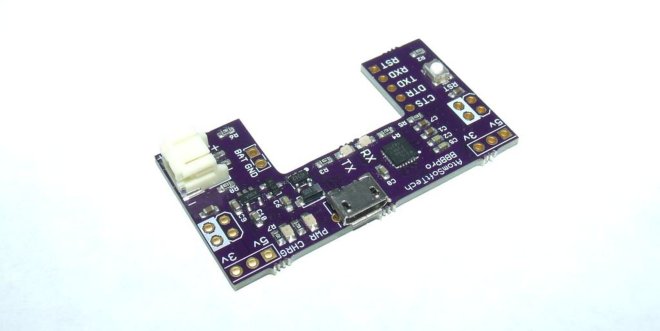
The BBBPro is a 4 in 1 breadboard tool. The amount of time you save using this is crazy! Ive been using my original Breadboard Buddy for years and the main addition is the newer CP2104 and Lipo Charging.
The board can be broken down into four main parts.
USB Power, USB 2 UART, LIPO Charger, Reset Button.
USB Power
Using a MicroUSB cable you can supply the board with its power. The board can output 5v and 3.3v simultaneously. Using the Jumpers on each of the top corners you can select which supply goes to which rail on breadboard.
If using a battery please note that there will obviously be no 5v supply. You can take 4.2 (or what ever the voltage on battery may be) from the BATT pin. Otherwise it will supply power to the 3.3v regulator and you can still use that on the power rails.
USB 2 UART
The USB to UART uses the CP2104, its a beautiful less expensive part than the FT232RL. It has a RX and TX led for indication of data transmission and reception. Supports 5/6/7/8 Data bits, Stop Bits 1/1.5/2, Parity odd/even/mark/space/none, Baud Rates 300bps to 2Mbits. Has a 576 transmit and receive buffer.
Lipo Charger
Uses the widely known and trusted MCP73831 for lipo charging. These ICs are so popular and tested so much that it almost guarantees your battery will be charged safely. The same charging circuit is used by other suppliers of similar circuits. What makes mines special is the ability to still supply power to circuit while charging, without crossing the voltage. Has a option for 100mA or 500mA charging on bottom. (Solder Jumper)
Reset Button
Just about any breadboard user knows how important a reset button can be. Using DIP MCUs are awesome for prototyping but all these extra components can take up so much space. This button isnt taking any space away. Also its pull up to 3.3v or 5v so you MCU is safe. (please ensure you select correct voltage on solder jumper on bottom) Can be used as a General Purpose pulled up button as well.
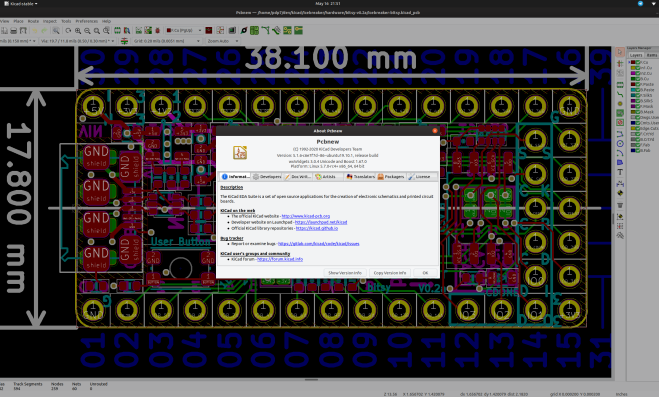
The KiCad project is proud to announce the latest series 5 stable release. The 5.1.6 stable version contains critical bug fixes and other minor improvements since the 5.1.5 release. It also includes improved footprint, symbol, and 3D model libraries, translations, and documentation.
This is also the first stable point release made since switching to gitlab for main kicad source code hosting.
A list of all of the fixed bugs since the 5.1.5 release can be found on the KiCad 5.1.6 milestone page. This release contains several critical bug fixes so please consider upgrading as soon as possible.
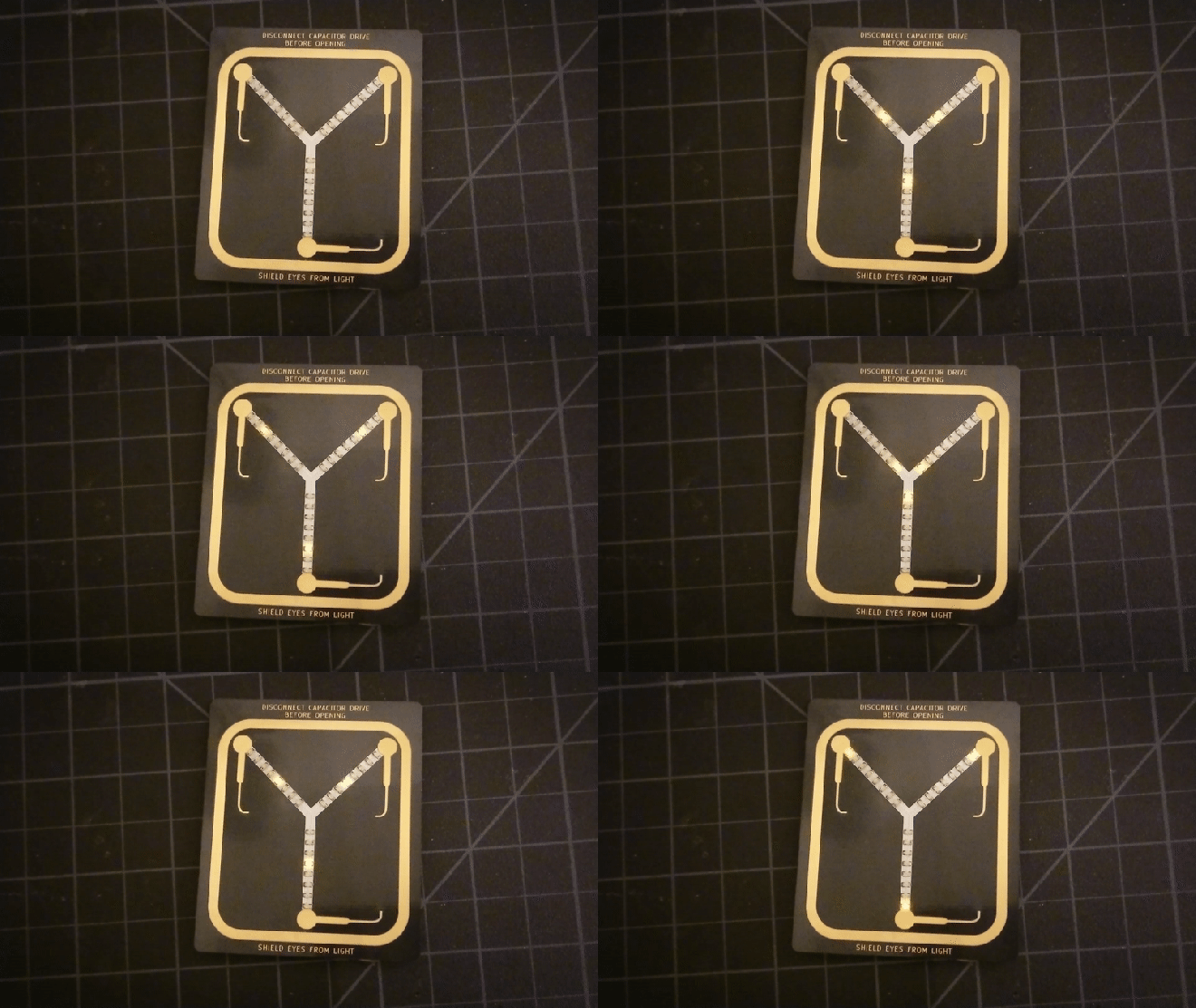
We really like this “Back to the Future”-themed Flux Capacitor badge add-on (SAO) by Squaro Engineering made with our “After Dark” service (which features clear soldermask on black fiberglass substrate).
Flux Capacitor SAO on @oshpark's beautiful After Dark PCBs! No code required; uses a Schmitt trigger oscillator + decade counter pic.twitter.com/AISdK33OX6
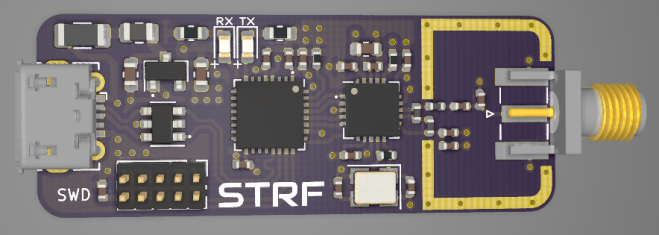
Overview of STM32, RF, and USB hardware design, schematic creation, and PCB layout and routing in KiCad using a real-world example project. (Timestamps in description) Various tips on controlled impedance routing, differential pairs, USB, and RF layout. Correction in schematic: NRF24 IREF pin needs to be pulled low to GND via a 10k resistor (not to 3V3 as shown in the video!). Fix has been pushed to GitHub.
It was only last August that PJRC released Teensy 4.0. At that time, the 4.0 became the fastest microcontroller development board on the planet, a title it still holds as of this writing — or, well, not exactly. Today the Teensy 4.1 has been released, and using the same 600 MHz ARM Cortex M7 under the hood, is now also the fastest microcontroller board. What the 4.1 brings to the table is more peripherals, memory, and GPIOs. While Teensy 4.0 used the same small form factor as the 3.2, Teensy 4.1 uses the larger board size of the 3.5/3.6 to expose the extra goodies.
The now slightly older Teensy 4.0 — released on August 7th of last year — is priced at $19.95, with the new 4.1 version offered at $26.85. It seems that the 4.1 isn’t intended as a replacement for the 4.0, as they serve different segments of the market. If you’re looking for an ultra-fast affordable microcontroller board that lives up to its Teensy name, the 4.0 fits the bill. On the other hand, if you need the additional peripherals broken out and can afford the space of the larger board, the not-as-teensy-sized 4.1 is for you. How big is it? The sample board I measured was 61 x 18 mm (2.4 x 0. 7″), not counting the small protrusion of the micro-usb jack on one end.
Let’s have a look at all the fun stuff PJRC was able to pack into this space.
100 MBPS ETHERNET
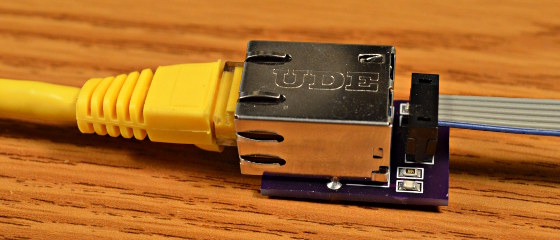
The big news is that Teensy 4.1 comes with 100 Mbps Ethernet support. To use the Ethernet port, you need to supply external magnetics and an RJ-45 jack. These were left off the board for obvious reasons — even using a jack with integrated magnetics (magjack), it wouldn’t fit on the PCB. Instead, a 6-pin header on the board can connect to an external interface. This also helps keep the price low for those who need the other features of the 4.1 without Ethernet connectivity.
PJRC will likely sell a DIY kit of the required parts in the future, but they don’t have a release date or pricing yet. For now, you can easily build your own using this OSH Park shared project. The parts list is in the project’s description, with the key part being the magjack, which will set you back around $2.55 in single quantities. Those building a board should note that this is an early version, and it turns out that only the 0.1 uF capacitor is necessary. Paul Stoffregen of PJRC told me that he just received a simpler PCB for testing, and will publish the design once it’s has been thoroughly verified.
The Ethernet port is capable of full 100 Mbps speed and supports the IEEE 1588 precision time protocol, which allows synchronization of clocks to within 100 ns over wired connections, enabling some very interesting possibilities. But, aside from that, just the inclusion of Ethernet on a microcontroller board is a big deal. Before this, you basically had two choices if you needed this kind of connectivity: use a powerful single-board-computer like a Raspberry Pi with all the latency and headaches the required operating system brings for doing low-level or real-time tasks, or add a slow SPI-interfaced Ethernet board to an existing microcontroller. Instead, you can now use the 600 MHz Cortex-M7 on this new board to run high-bandwidth, low-latency embedded applications without fighting an OS.
Give your grizzled and cramped hands a break from stuffing boards with surface mount components. This is the job of pick and place machine, and over the years these tools of the trade for Printed Circuit Board Assembly (PCBA) have gotten closer to reality for the home shop; with some models diving below the $10,000 mark. But if you’re not doing it professionally, those are still unobtanium.
The cost of this one, on the other hand, could be explained away as a project in itself. You’re not buying a $450 shop tool, you’re purchasing materials to chase the fever dream of building an open source pick and place machine. There are two major parts here, an X/Y/Z machine tool that can also rotate the vacuum-based parts picker, and the feeders that reel out components to be placed. All of this is working, but there’s still a long road to travel before it becomes a set and forget machine.
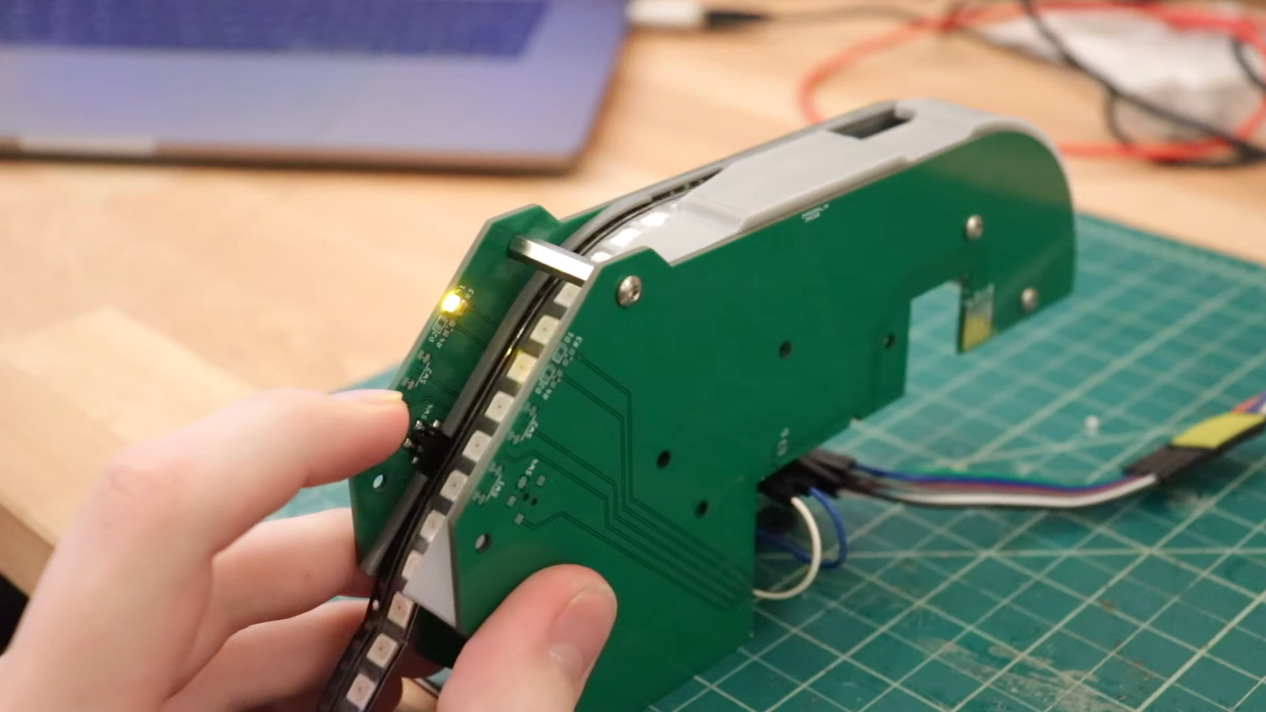
The rubber hits the road in two ways with pick and place machines: the feeders, and the optical placement. The feeders are where [Stephen Hawes] has done a ton of work, all shown in his video series that began back in January. The stackup of PCBs and 3D-prints hangs on the front rail of the gantry assembly, is adjustable for tape widths, and uses an interesting PCB encoder wheel and worm-gear for fine-tuning the feed. [Stephen’s] main controller board, a RAMPS shield for and Arduino Mega that runs a customized version of Marlin, can work with up to 32 of these feeders.
The certification site includes a full list of all of the certified open source hardware. Here is all of the hardware that was certified in April, which comes from the United States, Azerbaijan, India, Croatia, Germany, Poland, and Spain.
The OSHW community had been off to a strong start in 2020 with 54 projects certified in Q1. After February, we predicted here on Makezine.com that the certification program was on track for its strongest year ever. The surge in April has far surpassed our expectations with a total of 269 total projects certified last month alone, nearly twice that of 2019 in just one month.
Adafruit (All The Things)
Open Hardware leader Adafruit has dedicated a massive amount of time and effort towards certifying their back catalog of products. Hundreds have already passed certification at the time of writing this. We colloquially dubbed last month “Adafruit April” because of the sheer number of projects. In an interview with OSHdata, Founder Limor Fried takes us behind the scenes:
“Adafruit had certified some boards in the past to help support the effort. The barrier for certification for us was time. For us, the question was – do we stop everything and try to certify hundreds of boards? Or do we keep making open-source hardware? We choose to keep making open-source hardware with a goal to get it certified eventually, and/or wait for an API to automate the certification,” Fried explains.
Then COVID-19 happened. Adafruit has been running for 60+ days with no illnesses, no layoffs, no furlough, and no cut hours. They continued operations (after being deemed an essential business in NYC by Executive Order 202.6). Despite being busier than ever, this was also a time for reflection.
“It did occur to us that while our hardware is and always will be open-source, it was not certified. In March with the death rate increasing each day, as grim as it sounds, it was unclear what could happen to any of us in NYC or Adafruit. What is the best thing we can do for our community?” she and the team asked themselves.
That’s when Adafruit team members stepped up to take on the Herculean effort of submitting and certifying hundreds of products.
“We’re not going to make as much hardware during this time… And while some of the team was diverted for critical needs, we decided to spend time putting the hardware through the certification process so it’s clear our intentions for our hardware, it’s open source, forever, certified, no matter what. Dylan on our team led this effort and at this time 5/4/2020, Adafruit has certified 261 boards, with more to come, Adafruit is now 36.76% of all certified hardware. The phrase ‘never let a crisis go to waste’ was applied here to continue to be a good cause, a good company, and give all we can in every way.”
It’s impractical to go into detail about each of these projects — there are too many and this is but a simple blog post. Instead, we’d like to offer perspective on one of the certified projects: the Adafruit Trinket M0 (US000239). It’s a tiny microcontroller board built around the Atmel ATSAMD21 for use with CircuitPython and Arduino IDE. This small, affordable, and powerful platform is a great way to add interactivity to just about any project. For some context, we spoke with a pro.





The rubber hits the road in two ways with pick and place machines: the feeders, and the optical placement. The feeders are where [Stephen Hawes] has done a ton of work, all shown in his video series that began back in January. The stackup of PCBs and 3D-prints hangs on the front rail of the gantry assembly, is adjustable for tape widths, and uses an interesting PCB encoder wheel and worm-gear for fine-tuning the feed. [Stephen’s] main controller board, a RAMPS shield for and Arduino Mega that runs a customized version of Marlin, can work with up to 32 of these feeders.

 OSH Park