Tidy Laser Cut Packaging For PCBs With KiCAD

A laser cutter is a useful tool to have in any workshop. While many hackers use them for their cutting abilities, it’s important to remember that they can be great as engravers, too. [Wrickert] was well aware of this when he set his to work, producing attractive packaging for his Tindie orders.

[Wrickert] sells a variety of small PCB-based devices on Tindie, and it’s nice to have something to package them up with, rather than just sending a bare board. To do this quickly and effectively, KiCAD is used to help generate the packaging from the original PCB geometry itself. The board outlines are exported as an SVG file, reopened in KiCAD, and then used to create the required cardboard parts. The laser can then also be used to engrave the cardboard too.

It’s a tidy packaging solution that requires no messy inks or printers, and can be designed in the same software as the device itself. We’ve covered this area before, talking about what it takes to go from a home project to a saleable kit. If you’re in the game, you might find [Wrickert]’s hack to be just the ticket!

via Tidy Laser Cut Packaging For PCBs With KiCAD — Hackaday

Quote

Adding PCIe To Your Raspberry Pi 4, The Easier Way

raspberry_pi_4_installed_pcie_bridge

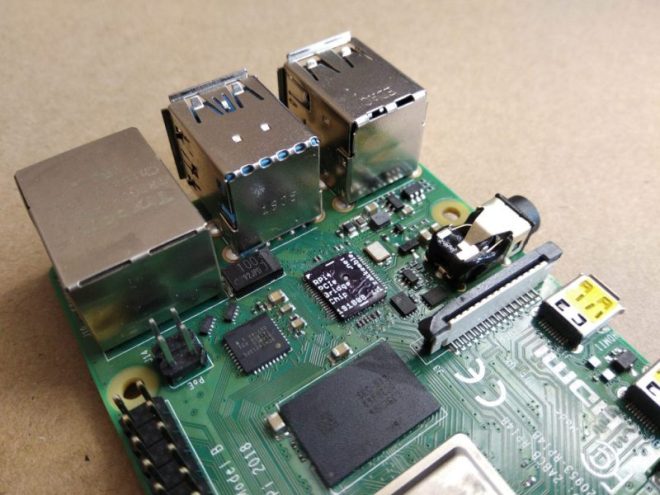
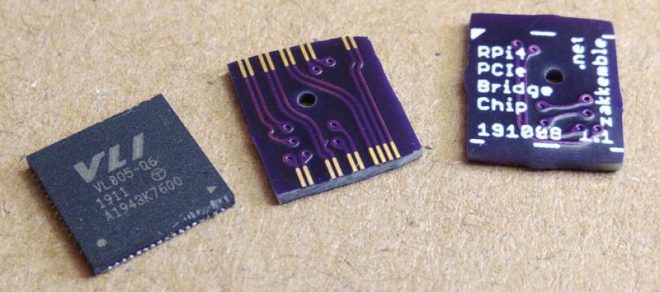
Ever since people figured out that the Raspberry Pi 4 has a PCIe bus, the race was on to be the first to connect a regular PCIe expansion card to a Raspberry Pi 4 SBC. Now [Zak Kemble] has created a new approach, using a bridge PCB that replaces the VL805 USB 3 controller IC. This was also how the original modification by [Tomasz Mloduchowski] worked, only now it comes in a handy (OSHPark) PCB format.

rpi4_bridge_chip-1024x454-1

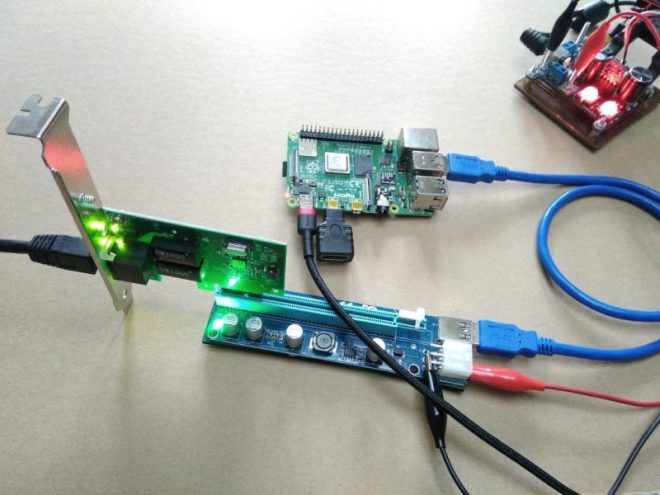
After removing the VL805 QFN package and soldering in the bridge PCB, [Zak] confirmed that everything was hooked up properly and attempted to use the Raspberry Pi 4 with a PCIe extender. This showed that the Raspberry Pi would happily talk with a VL805-based USB 3.0 PCIe expansion card, as well as a Realtek RTL8111-based Ethernet card, but not a number of other PCIe cards. Exactly why this is is still unclear at this point.

raspberry_pi_4_pcie_expander

As a bonus, [Zak] also found that despite the removal of the VL805 IC from the Raspberry Pi rendering its USB 3 ports useless, one can still use the USB-C ‘power input’ on the SBC as a host controller. This way one can have both PCIe x1 and USB on a Raspberry Pi 4.

This is the third iteration we’ve seen for using PCIe with the Pi. If you’re building on the work of [Thomasz Mloduchowski], which inspired [Colin Riley] to add expanders, and now this excellent hack by [Zak], we want to hear about it!

via Adding PCIe To Your Raspberry Pi 4, The Easier Way — Hackaday

Quote

Agricoltura: connected control system for agriculture

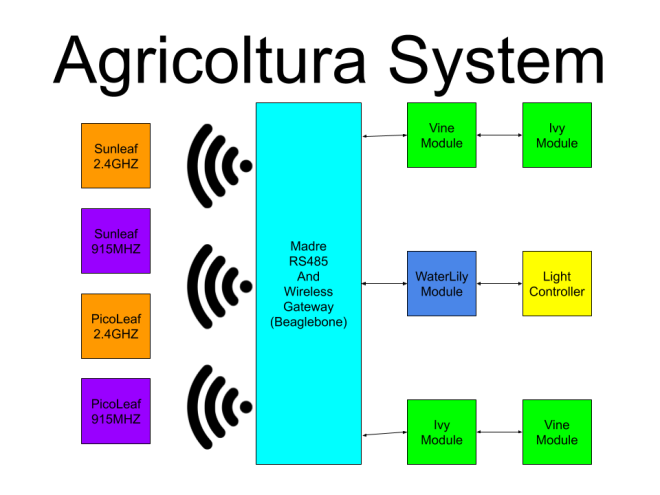
Adam Vadala-Roth has posted on Hackaday.io about a connected control system for all agriculture applications based on RS485 control nodes and multiple wireless sensor networks:

8246911593228843731

Agricoltura

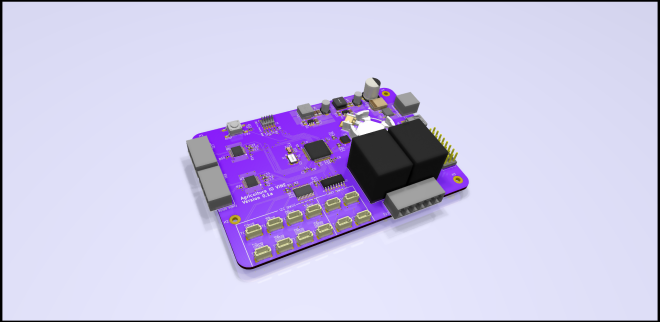
Agricoltura is the culmination of multiple projects I’ve worked on in the past related to the sensing and control of agriculture systems, notably HydroPWNics and SunLeaf.  Agricoltura aims to unite all the concepts of those past projects into a new system based primarily on RS485 nodes for control of pumps, sensor sampling, and light control.

The base system will be a gateway controller linked to daisy chainable RS485 nodes designed for specific functions. These nodes are built around a board called Vine.
Vine allows interfacing of QWIIC connect sensros and devices as well as relay control. Coming in as two varients Vine can be used to setup and control complete hydroponic farming systems or any other agriculture system.

4070251593134247670


Agricoltura: connected control system for agriculture

Creating A Custom ASIC With The First Open Source PDK

A process design kit (PDK) is a by now fairly standard part of any transformation of a new chip design into silicon. A PDK describes how a design maps to a foundry’s tools, which itself are described by a DRM, or design rule manual. The FOSSi foundation now reports on a new, open PDK project launched by Google and SkyWater Technology. Although the OpenPDK project has been around for a while, it is a closed and highly proprietary system, aimed at manufacturers and foundries.

The SkyWater Open Source PDK on Github is listed as a collaboration between Google and SkyWater Technology Foundry  to provide a fully open source PDK and related sources. This so that one can create manufacturable designs at the SkyWater foundry, that target the 130 nm node. Open tools here should mean a far lower cost of entry than is usually the case.

via Creating A Custom ASIC With The First Open Source PDK — Hackaday

Quote

Custom Portable N64 Embraces Modern Making

zeldaportable_feat

In the beginning, there was hot glue. Plus some tape, and a not inconsiderable amount of Bondo. In general, building custom portable game consoles a decade or so in the past was just a bit…messier than it is today. But with all the incredible tools and techniques the individual hardware hacker now has at their disposal, modern examples are pushing the boundaries of DIY.

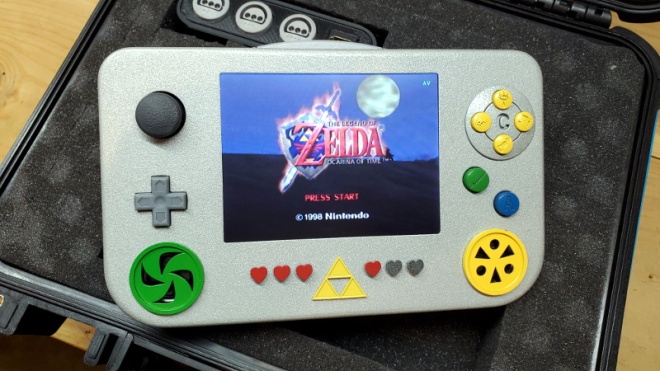
This Zelda: Ocarina of Time themed portable N64 by [Chris Downing] is a perfect example. While the device is using a legitimate N64 motherboard, nearly every other component has been designed and manufactured specifically for this application. The case has been FDM 3D printed on a Prusa i3, the highly-detailed buttons were printed in resin on a Form 3, and several support PCBs and interface components made the leap from digital designs to physical objects thanks to the services of OSH Park.

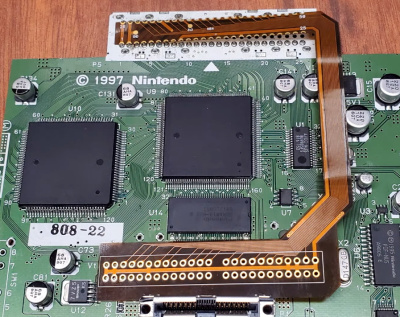
zeldaportable_detailA custom made FFC to relocate the cartridge port.

Today, those details are becoming increasingly commonplace in the projects we see. But that’s sort of the point. In the video after the break, [Chris] breaks down the evolution of his portable consoles from hacked and glued together monstrosities (we mean that in the nicest way possible) to the sleek and professional examples like his latest N64 commission. But this isn’t a story of one maker’s personal journey through the ranks, it’s about the sort of techniques that have become available to the individual over the last decade.

Case in point, custom flexible flat cables (FFC). As [Chris] explains, when you wanted to relocate the cartridge slot on a portable console in the past, it usually involved tedious point-to-point wiring. Now, with the low-volume production capabilities offered by companies like OSH Park, you can have your own flexible cables made that are neater, faster to install, and far more reliable.

Projects like this one, along with other incredible creations from leaders in the community such as [GMan] are changing our perceptions of what a dedicated individual is capable of. There’s no way to be sure what the state-of-the-art will look like in another 5 or 10 years, but we’re certainly excited to find out.

via Custom Portable N64 Embraces Modern Making — Hackaday

Quote

Hackaday: Lonnie Johnson, Prolific Engineer And Hero To Millions Of Kids (Even If They Don’t Know It)

To be a child in the 1970s and 1980s was to be of the first generations to benefit from electronic technologies in your toys. As those lucky kids battled blocky 8-bit digital foes, the adults used to fret that it would rot their brains. Kids didn’t play outside nearly as much as generations past, because modern toys were seducing them to the small screen. Truth be told, when you could battle aliens with a virtual weapon that was in your imagination HUGE, how do you compete with that.

How those ’80s kids must have envied their younger siblings then when in 1990 one of the best toys ever was launched, a stored-pressure water gun which we know as the Super Soaker. Made of plastic, and not requiring batteries, it far outperformed all squirt guns that had come before it, rapidly becoming the hit toy of every sweltering summer day. The Super Soaker line of water pistols and guns redefined how much fun kids could have while getting each other drenched. No longer were the best water pistols the electric models which cost a fortune in batteries that your parents would surely refuse to replace — these did it better.

You likely know all about the Super Soaker, but you might not know it was invented by an aerospace engineer named Lonnie Johnson whose career included working on stealth technology and numerous projects with NASA.

via Lonnie Johnson, Prolific Engineer And Hero To Millions Of Kids (Even If They Don’t Know It) — Hackaday

Quote

The Fascinating World Of Solder Alloys And Metallurgy

Solder is the conductive metal glue that one uses to stick components together. If you get the component and the PCB hot enough, and melt a little solder in the joint, it will stay put and conduct reliably. But it’s far from simple.

There are many different solder alloys, and even the tip of the soldering iron itself is a multi-material masterpiece. In this article, we’ll take a look at the metallurgy behind soldering, and you’ll see why soldering tip maintenance, and regular replacement, is a good idea. Naturally, we’ll also touch upon the role that lead plays in solder alloys, and what the effect is of replacing it with other metals when going lead-free. What are you soldering with?

Intermetallic Compounds

Soldering, and its higher temperature cousin, brazing, are one of essentially two ways create metal-to-metal bonds, and they allow the use of low-temperature techniques that still create relatively stable bonds between two metal surfaces. Soldering is also an interesting chapter in the field of metallurgy, on account of it being based around so-called intermetallic compounds (IMCs).

Welding stands in contrast to soldering, where high temperatures melt the metal on both sides of the pieces that are being joined, permanently fusing them. Welding is a high-strength, high-reliability way of joining metal pieces, but is unfortunately wholly unsuited for delicate electronics where excess heat can damage parts and the goal is more to ‘glue’ electrically conducting elements together than to melt them together.

This also leads us to the reason why soldering and IMCs are such a source of trouble, to the point where IMCs are referred to as ‘evil’. IMCs are essentially bits of the two metal surfaces on either side dissolved into the solder, causing enough of a joining that each side of the joint is more or less stably fused with the solder. Unfortunately such an IMC is a far cry from the stable solid metal of a welding joint, and as a result can be brittle depending on exactly which metals were involved in the solder alloy.

But the IMCs formed in soldering are strong enough, and their formation is at the root of why every solder alloy uses tin. Tin has the property that it is very good at letting other metals dissolve into it. In fact, it’s possible to solder with pure tin, although as we’ll see below, most solder is improved by adding other metals into the mix.

via The Fascinating World Of Solder Alloys And Metallurgy — Hackaday

Quote

Dexter the Companion Bot Wants To Give You Five

From Roger Cheng on Hackaday:

The main character of Dexter’s Laboratory is a genius child inventor who inspired a lot of fans to become makers and inventors in their own right. [Jorvon Moss] a.k.a. [Odd_Jayy] counts himself as one of them. A serial companion bot builder, his projects are constantly evolving. But every once in a while he pauses long enough to share construction details. Like how we can build our own monkey companion bot Dexter named after the cartoon.

A slightly earlier iteration of Dexter attended Hackaday Superconference 2019. Perched on [Odd_Jayy]’s back, Dexter joined in a presentation on companion bots. We’ve been a fan of his work since Asi the robot spider and several more robots have been posted online since. Recently at Virtually Maker Faire 2020, he joined [Alex Glow] and [Angela Sheehan] to talk about their respective experiences Making Companion Bots.

[Odd_Jayy] starts with sketches to explore how a project will look and act, striving to do something new and interesting every time. One of Dexter’s novelties is adding interactivity to companion bots. Historically people couldn’t do much more than just look at a companion bot, but Dexter can high five their fans! Sometimes the excited robot monkey ends up slapping [Odd_Jayy] instead, but they’re working through issues in their relationship. Everyone is invited to see rapid cycles of iterative improvements on Twitter and Instagram. As of this writing, a mini Dexter is underway with design elements similar to the “Doc Eyes” goggle project running in parallel. It’s always fun to watch these creations evolve. And by openly sharing his projects both online and off, [Odd_Jayy] is certainly doing his part to inspire the next wave of makers and inventors.

via Dexter the Companion Bot Wants To Give You Five — Hackaday

Quote

Adjustable Jig Eases PCB Stencil Alignment Process

PCB stencils make application of solder paste a snap, but there’s a long, fussy way to go before the paste goes on. You’ve got to come up with some way to accurately align the stencil over the board, which more often than not involves a jury-rigged setup using tape and old PCBs, along with a fair amount of finesse and a dollop of luck.

Luckily, [Valera Perinski] has come up with a better way to deal with stencils. The Stencil Printer is a flexible, adjustable alignment jig that reduces the amount of tedious adjustment needed to get things just so. The jig is built mostly from aluminum extrusions and 3D-printed parts, along with a bunch of off-the-shelf hardware. The mechanism has a hinged frame that holds the stencil in a fixed position above a platen, upon which rests the target PCB. The board is held in place by clamps that ride on threaded rods; with the stencil flipped down over the board, the user can finely adjust the relative positions of the board and the stencil, resulting in perfect alignment. The video below is mainly a construction montage, but if you skip to about the 29:00 mark, you’ll see the jig put through its paces.

Granted, such a tool is a lot more work than tape and spare PCBs, but if you do a lot of SMD work, it may be worth the effort. It’s certainly less effort than a solder-paste dispensing robot.

via Adjustable Jig Eases PCB Stencil Alignment Process — Hackaday

Quote